
Does HomeBudget+ Still Open Fast?
Von Ali Pilehvary am 16.09.2026
Somewhere in the middle of this semester, after wiring up an encrypted database, a category-learning system, recurring expense logic, and local notifications, I realized I had no idea what all of that actually cost the user in the first few seconds after tapping the app icon. Every one of these features runs the moment the app starts, before anything is shown on screen. I wanted to know: after all of this, does HomeBudget+ still open fast?
What actually happens at startup
The moment the app launches, it opens the encrypted SQLite database, loads every expense, income, budget, recurring rule and category rule into memory, and asks for notification permission. None of that happens later – it all happens before the first screen is even drawn. If any of it were slow, it would be slow every single time someone opens the app, which makes this exactly the kind of thing worth actually measuring instead of assuming.
Measuring it with ADB
Android has a built-in way to measure this precisely, through ADB (the same tool Android Studio already uses to install the app). A single command force-closes the app completely and then relaunches it while timing exactly how long the app takes to become interactive – what Android calls a cold start, the most demanding kind, since nothing is left in memory to reuse.
Doing this once wouldn’t mean much, since any single run can be thrown off by something unrelated happening on the phone at that moment. So I wrote a small script to force-close and relaunch the app five times in a row and average the results.
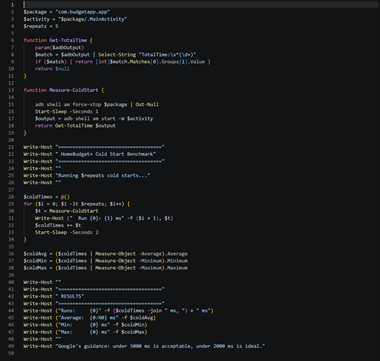
Figure 1: the cold-start measurement script.
Results
Running it on a real Android device gave this:
| Run | Time |
| 1 | 963 ms |
| 2 | 1136 ms |
| 3 | 1164 ms |
| 4 | 1160 ms |
| 5 | 1185 ms |
| Average | 1122 ms |
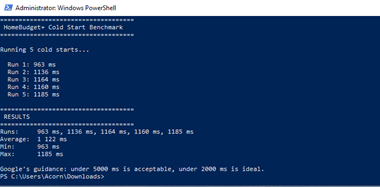
Figure 2: the actual benchmark run.
Just over one second, on average, from a completely closed app to a usable screen – with the encrypted database, all the loaded data, and the permission prompt already accounted for.
Is that actually fast?
Google’s own guidance for Android apps is that a cold start under 5 seconds is acceptable, and under 2 seconds is considered good. HomeBudget+ came in at close to half of that upper target, comfortably inside the range Google considers good, even with everything this semester’s features added to what has to run before the first screen appears.
Closing thought
I went into this expecting to find a startup cost worth optimizing away. What I actually found was that the heavier database and the extra logic added this semester didn’t push the app anywhere near a noticeable delay. Sometimes the useful result of measuring something isn’t finding a problem – it’s confirming there wasn’t one to begin with.
What I learned
The instinct to assume “more features must mean a slower launch” turned out to be the wrong starting point. It’s an easy assumption to make, but it isn’t automatically true – encrypted database access, in-memory loading, and a permission prompt all sound expensive on paper, yet together they added up to about a second on a real device. The only way to actually know was to measure it against a concrete standard, rather than trusting a gut feeling either way.
Sources
Android app startup time (Google’s official cold/warm/hot start guidance): https://developer.android.com/topic/performance/vitals/launch-time

The comments are closed.