
What the hell ist capacitor?
Von Kevin Kraushofer am 20.01.2026
Hello dear blog readers! This post is for all mobile developers who, just like me at the beginning, are asking themselves “What the hell is Capacitor” actually? We all know and love Ionic. But hand on heart: Often terms pop up that cause confusion at first. For me, Capacitor was exactly such a candidate. That’s why I’m dedicating this article entirely to this topic today. We’ll look together at what Capacitor actually is. I’ll also explain to you how it works and what it can do.
Basic knowledge about Capacitor
Let’s start with the basics. Capacitor is a “Cross-Platform Native Runtime.” It was developed in 2018 by the Ionic Team to replace Cordova (the standard tool of the past). To put it simply: It is a runtime environment that works on different platforms. It works quite easily too. It takes your modern web app (HTML, CSS, JS) and packages it so that it can run on iOS, Android, and as a PWA (Progressive Web App). And the best part? Although it is web technology, you are allowed to access native functions like the camera or GPS.
But how does that work if it’s not a native environment? Normally, a website runs in the browser in a sandbox. It is isolated and cannot access everything for security reasons. With Capacitor, however, your website doesn’t run in the normal browser window, but in a WebView. And this WebView is part of a real native app. Since this shell is a real app, it can access the camera or the GPS.
Example
To understand the workflow of capacitor her is a small example:
Imagine you are building a blog app where you can create posts. You want the user to be able to upload a photo directly with their camera under a post. With Capacitor the way would be simple. You simply write something in JavaScript like Camera.getPhoto(). Capacitor, acting as a bridge, intercepts the command and notices: “Aha, the user wants to operate the camera.” Thereupon, Capacitor sends a message to the native part of the app (native shell). Now it checks which phone the user is using. If the user has an iPhone, for example, the command is translated for Swift. The same applies to Android, only it gets translated for Java/Kotlin. Then the smartphone can execute the native code and enable access to the camera. The photo is taken and then sent back to the JavaScript via Capacitor. And that’s how you have your photo in the blog post.
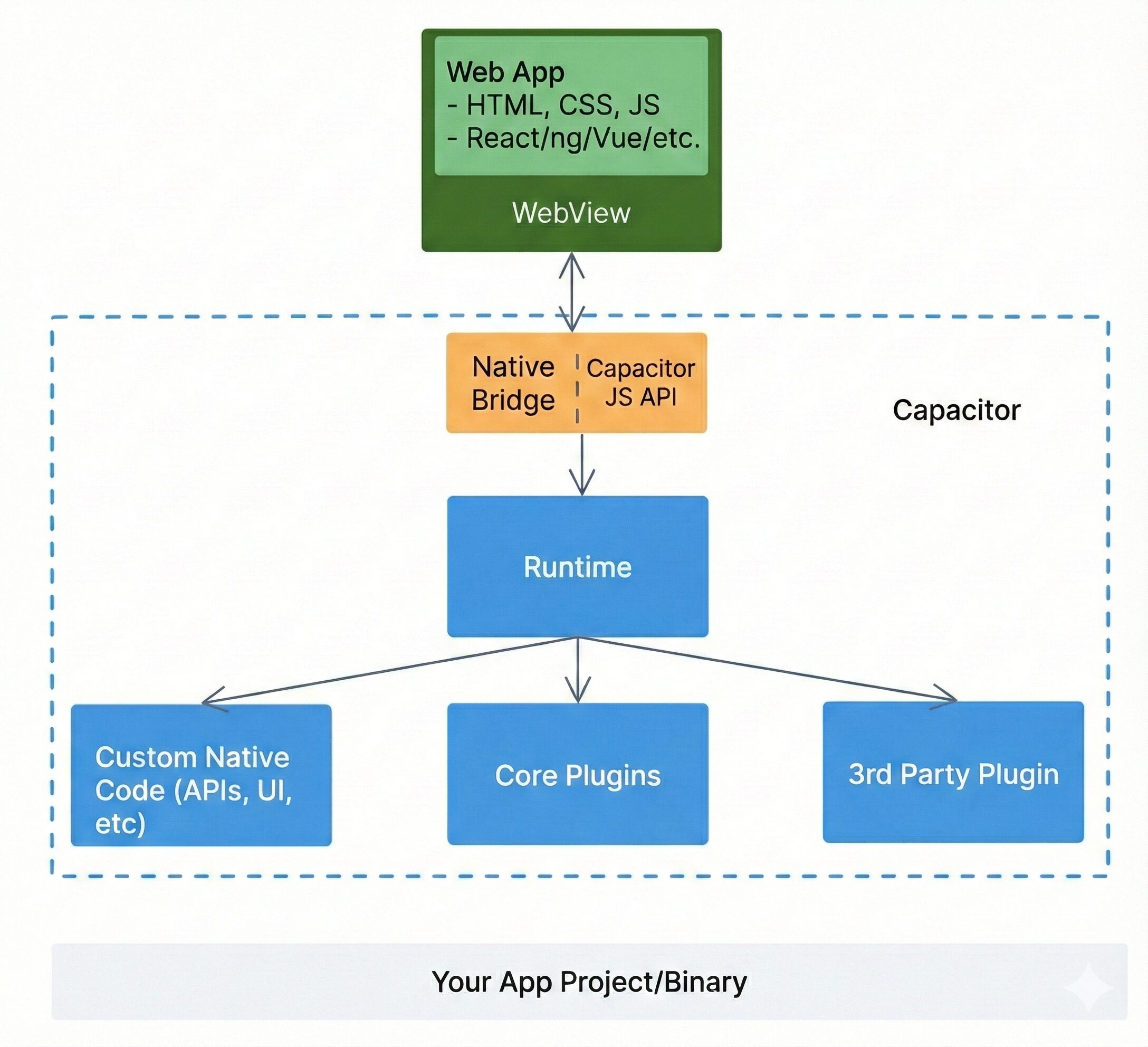
So in summary: Capacitor works as an intermediary between the web app and the smartphone’s operating system and ensures that both can talk to each other. Cool, right?
Capacitor Plugins
To make everything work, Capacitor offers a ton of plugins. These can be divided into:
- Core plugins
- Community plugins
- Enterprise plugins
Core plugins, as the name reveals, are plugins (26 in number) that were already integrated into Capacitor at the time of release. This “starter pack” covers the most important native functions. This includes Camera, Filesystem, Share, Google Maps, and many more.
Community plugins are represented in larger numbers, as these are also maintained by the community. This includes plugins we’ve heard of quite often, like SQLite or the HTTP community plugin.
Last but not least, the Enterprise Plugins, the business class. These are paid plugins from Ionic itself directly for companies. These plugins concentrate on security and authentication.
And if a suitable plugin still doesn’t exist, you can use the Plugin API to write your own code in Swift or Kotlin/Java and make it available in the web app via a JavaScript hook.
Why Capacitor at all?
Many developers used alternatives like React Native and are coming back to the web. Why? Because web technologies have become so damn good by now. And by the way, every developer’s dream is to have a single codebase for all platforms. With Capacitor, you can use your favorite web framework and simply bring the code to the mobile phone. An additional (huge) advantage of Capacitor compared to classic native development is that you change code and see the result directly, without compiling for minutes.
A (brief) look at the alternatives
To round off the picture, we also have to briefly address the alternatives, and Cordova shouldn’t actually be missing here.
Cordova: The grandfather of hybrid apps. Capacitor was practically built to replace exactly this tool. Capacitor is the modern successor, so to speak.
React Native: But React Native is also a strong alternative. React Native also uses JavaScript, but renders no WebView, but rather real native UI controls. It is more complex (and also slightly more performant) but deviates strongly from standard web development.
Flutter: Flutter uses the programming language Dart and its own rendering engine. It draws all UI components itself instead of using native controls or web technologies.
Swift/Kotlin: That is the classic way. It is actually only worth it for teams that have absolutely no desire for web technologies and need direct access to every single system detail from Apple or Google. The big catch: You are on a one-way street. Swift code for iOS does not run on Android. So you have to practically develop and maintain the app twice.
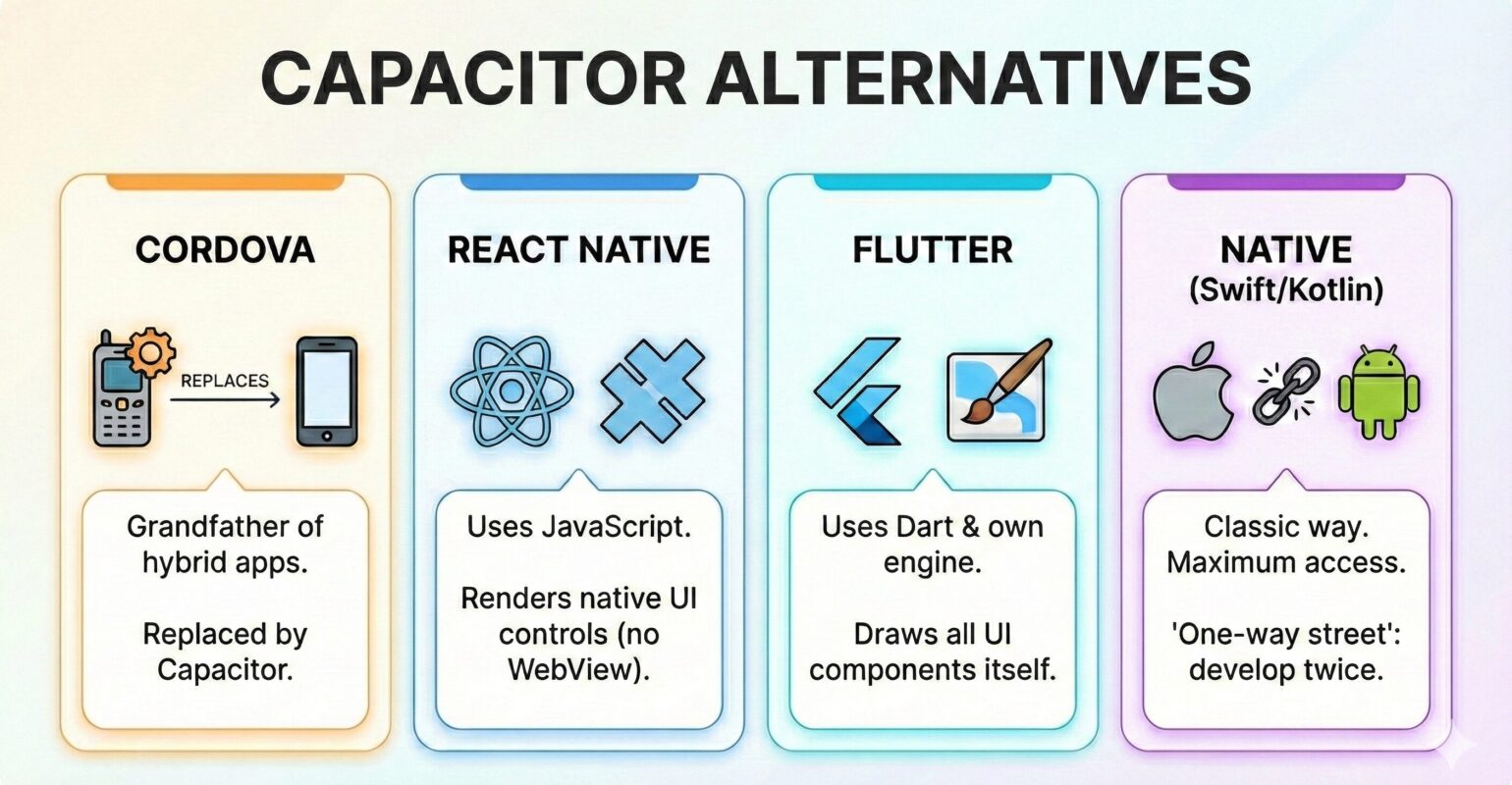
In short we can say that Capacitor is truly a game changer in mobile development. It was the missing puzzle piece that web developers were waiting for. It tears down the wall between web and native and makes it possible to build a real app with the tools you already master. For the majority of all apps out there, it is also the perfect choice. But if you want to program the next high-end 3D game or want a very close connection to the platform tools from tech giants like Apple, then perhaps Capacitor is not the best choice. Best of all, you save yourself double the work, use a single codebase, and still have access to cool native features with Capacitor.
Pictures: all pictures are created with google gemini (NanabananaPro)
Sources:
capacitorjs.com/
ionic.io/blog/how-capacitor-works-2
ionic.io/blog/capacitor-everything-youve-ever-wanted-to-know
Other Projects
Swiva is a mobile app for saving ideas, places, recipes and activities from TikTok, Instagram, Maps and the web, and actually turning them into plans.

The comments are closed.